Obligation Tracking
Signing a contract is not the end of the story. Most agreements create ongoing obligations — recurring payments, quarterly reports, insurance certificates, regulatory filings, or service deliverables. OpenCLM's Obligations module helps you track every one of them.
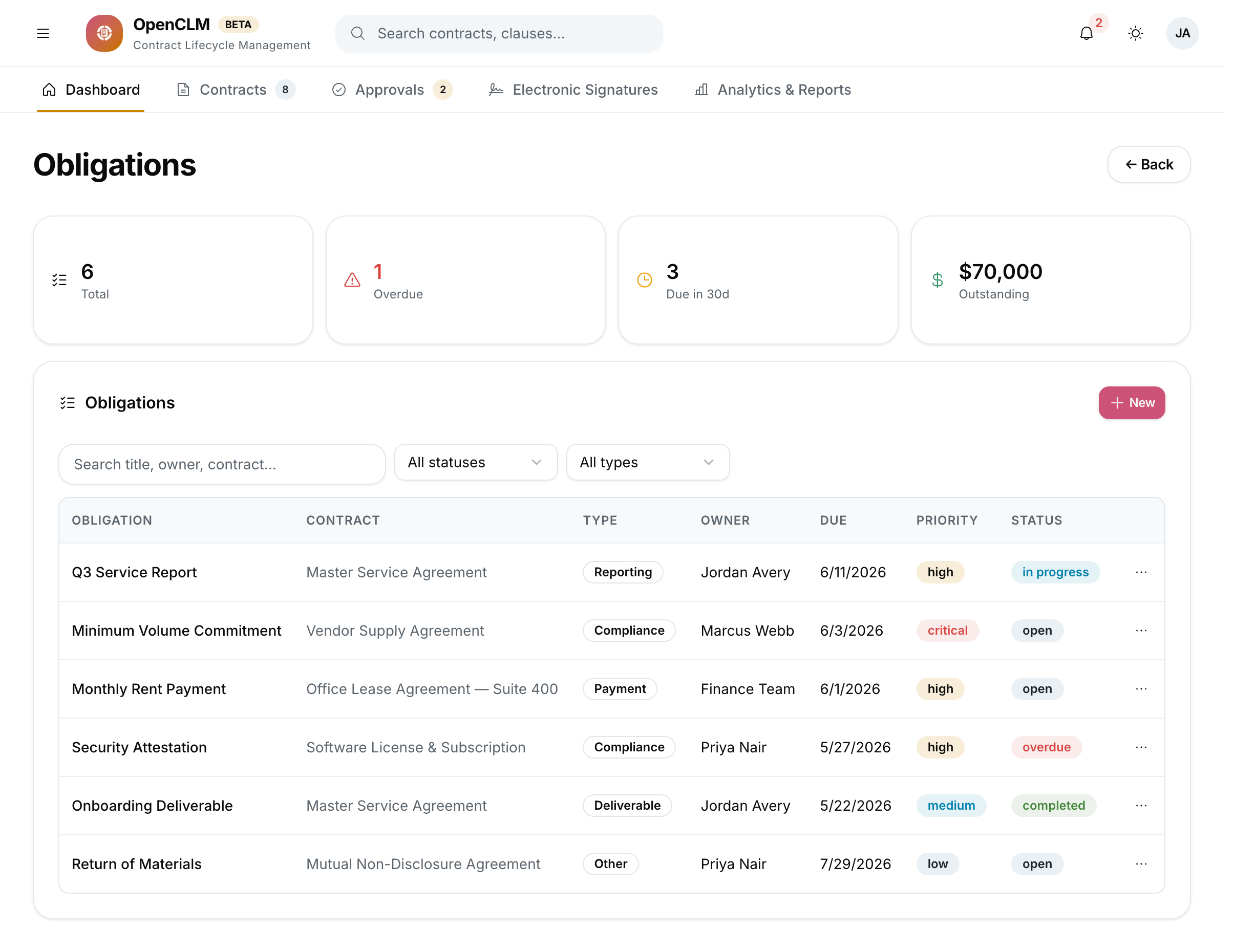
Accessing Obligations
Click Obligations in the left sidebar to see all obligations across your organisation.
What Is an Obligation?
An obligation is a specific duty that must be fulfilled by a date or on a recurring schedule, arising from a contract. Examples:
- "Submit quarterly performance report" — due every 3 months.
- "Maintain liability insurance of $1M" — ongoing.
- "Pay annual licence fee of $12,000" — due every January 1st.
- "Deliver Project Phase 1" — one-time, due June 30.
Creating an Obligation
- Open the relevant contract.
- Click the Obligations tab.
- Click Add Obligation.
- Fill in:
- Title — brief description of the duty
- Description — full details, including any contract reference (e.g. "Per Section 4.2")
- Obligation Type — Payment, Deliverable, Reporting, Compliance, Insurance, Other
- Responsible Party — Internal user or role responsible for fulfilling it
- Due Date — specific date, or recurring schedule (Daily / Weekly / Monthly / Quarterly / Annually)
- Value — monetary value if applicable
- Source — the contract this obligation comes from
- Click Save.
Tracking Obligation Status
Each obligation has a status:
| Status | Meaning |
|---|---|
| Pending | Not yet due |
| Due Soon | Due within the configured reminder window |
| Overdue | Past due date, not yet fulfilled |
| Fulfilled | Marked as complete by the responsible party |
| Waived | Formally waived by the contract manager |
The responsible party receives email reminders at the configured intervals before the due date.
Fulfilling an Obligation
When an obligation is complete:
- Open the obligation.
- Click Mark as Fulfilled.
- Optionally attach evidence (invoice, report PDF, etc.).
- Add a note describing what was done.
Fulfilment is logged and a notification is sent to the contract owner.
For recurring obligations, marking it fulfilled automatically creates the next occurrence with the next due date.
Organisation-wide View
The Obligations sidebar view shows all obligations across all contracts (filtered by your access permissions):
- Overdue tab — obligations past their due date.
- Due This Week / Due This Month tabs.
- All Obligations — searchable, filterable list.
Export
Export obligations to CSV for reporting to finance, legal, or procurement leadership.